What context engineering is
Context engineering means designing the background information handed to an AI on every request. In Anthropic's framing it covers everything assembled from sources other than the user's typed prompt: system prompt, skills, CLAUDE.md, memory and more.
Prompt versus context
Design prompts and context as different things
The difference is whether it gets reused. A prompt applies once, so it can be as specific as you like. Context applies across many requests, so it cannot be made specific in the same way. You have to prepare general guidance without knowing what will be asked. That is the hard part.
What makes it harder is that the right answer moves as models improve. Writing that used to work becomes counterproductive in a new generation. This publication is a report that such a turning point has arrived.
But when you send a message to Claude, the prompt is only a small part of the context it gets. Much of your context is assembled from your system prompt, Skills, CLAUDE.md files, memory, and other sources. We call this context engineering, and it makes a big impact on the results you generate when using Claude Code or in building your own agents. / Unlike a prompt, context is used generally across many requests, so it cannot be as specific. How do you build these general prompts and guidance for Claude, especially when you don't know what a user's prompt might be? — From the components of context and how it differs in nature from a prompt
Cutting 80% of the system prompt caused no degradation
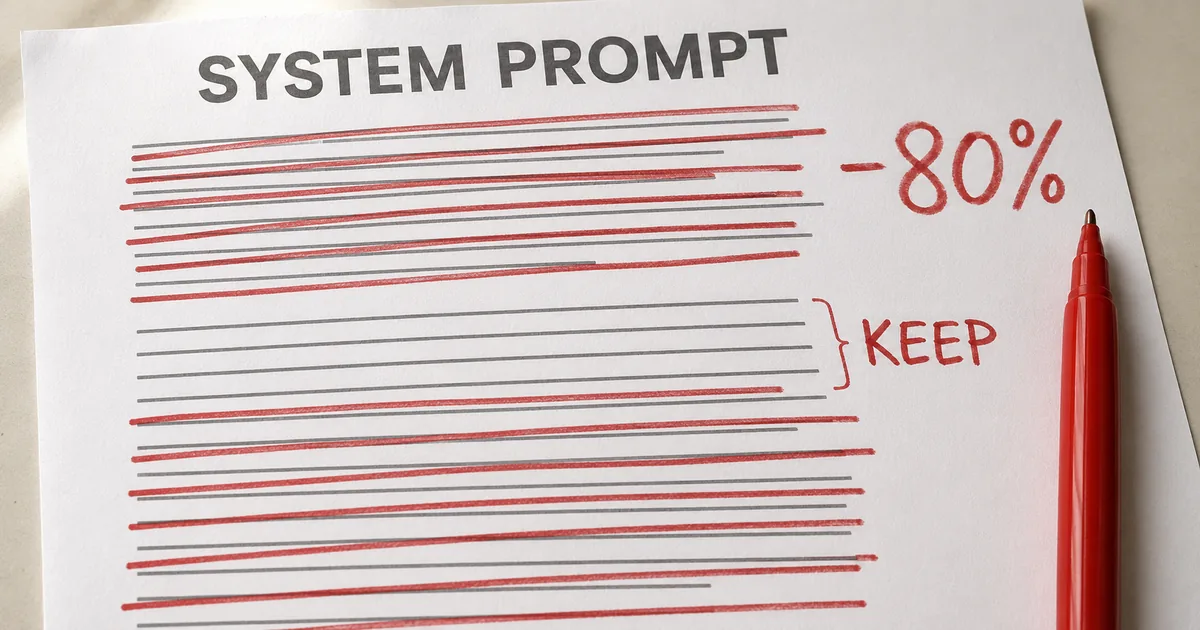
This is the number that draws attention. Anthropic removed over 80% of Claude Code's system prompt for newer-generation models like Claude Opus 5 and Claude Fable 5, with no measurable loss on its coding evaluations.
The cause it identifies is overconstraining Claude Code. Reviewing internal usage logs turned up multiple conflicting instructions within a single request—for example, "document as needed" and "don't write comments" colliding across the system prompt, a skill, and the user's own request.
Claude can interpret user intent and reach the right answer, but it has to work through those overlapping, conflicting messages first. That reconciliation cost was pure waste. Constraints once needed to avoid worst cases can now be dropped and left to surrounding context and judgment. The angle of reducing token consumption itself is covered in our article on Claude Code's startup token overhead.
We removed over 80% of Claude Code's system prompt for models like Claude Opus 5 and Claude Fable 5 with no measurable loss on our coding evaluations. / Overall, we found that we were overconstraining Claude Code, both through our system prompt and in our CLAUDE.md files and skills. / Generally, Claude can interpret the user's intent to get to the right answer, but Claude must think more carefully about these overlapping and conflicting messages before deciding what to do. — From the reported reduction and the description of overconstraining
The six reversals
The post presents six former best practices as myths, paired as Then and Now. Here is the overview first.
Context engineering, Then → Now (six items)
| # | Then | Now |
|---|---|---|
| 1 | Give rules | Let Claude use judgment |
| 2 | Show examples | Design interfaces |
| 3 | Put it all upfront | Load it when needed |
| 4 | Repeat yourself | One concise place: the tool description |
| 5 | Write memory into CLAUDE.md | Let automatic memory handle it |
| 6 | Simple specs | Rich references |
1. Stop binding with rules, leave room for judgment
When Claude Code first shipped, worst cases like deleting files had to be avoided, so strong instructions were placed even where they were not always right. The old system prompt contained lines like: in code, default to writing no comments; never write multi-paragraph docstrings or multi-line comment blocks—one short line max.
That instruction is plainly wrong for some requests: when the user has their own preferences, or when complex code needs a multi-line explanation. On older models, comment quality could not be held without such guardrails (forced rules that prevent runaway behavior), so the trade-off had to be accepted.
Newer models have better judgment and handle these decisions well without explicit rules. So the new system prompt replaces all of it with one sentence: write code that reads like the surrounding code, matching its comment density, naming, and idiom. A shift from enumerating prohibitions to stating a standard.
In code: default to writing no comments. Never write multi-paragraph docstrings or multi-line comment blocks — one short line max. Don't create planning, decision, or analysis documents unless the user asks for them — work from conversation context, not intermediate files. / In the new system prompt we say: Write code that reads like the surrounding code: match its comment density, naming, and idiom. — From the contrast between the old system prompt text and the new wording
2. Stop giving examples, design the interface
The number one rule for tool usage used to be showing examples. That has flipped too. With the newest models, examples were found to constrain the model to a certain exploration space.
What is recommended instead is thinking about the design of the tools, scripts and files themselves: what parameters exist, and how they can be made more expressive. That is where the effort should go.
The official example makes it concrete. In a Todo tool, simply typing the state as an enum (a type whose possible values are fixed in advance) of pending, in_progress and completed conveys how to use it. Add one line—keep in_progress to exactly one—and the desired behavior is defined. A type plus a short constraint works harder than a page of examples.
The number one rule for tool usage was to give Claude examples on how to use them. With our newest models, we've found that giving examples actually constrains them to a certain exploration space. Instead of using examples, think more about the design of your tools, scripts and files- what parameters does Claude have and how can they be more expressive? — From the shift away from examples toward interface design
3. Stop frontloading, read it when it is needed
Claude Code's system prompt used to carry detailed procedures for code review and verification—not always needed, but decisive when they were.
Not anymore. Claude Code became competent enough at loading the right context at the right time that verification and code review were moved into their own skills, called only when needed. This idea is called progressive disclosure.
It applies beyond skills. Lazy loading was applied to tools as well, with some tools now searched for and retrieved before use. You can grow the number of tools without consuming context until they are used. The same idea applies to your own CLAUDE.md and skills. A common myth is that you should make them a central repository of every practice because Claude would not find it otherwise—instead, build a tree of files that can be loaded at the right time.
Since then, Claude Code has gotten very competent at using progressive disclosure- loading the right context at the right times. For example, we moved verification and code review into their own skills that Claude Code could selectively call. / A common myth is that you want to make these a central repository for every known practice that you might run into, because Claude would not find it otherwise. Instead, consider having a tree of files that can be loaded at the right time. — From the shift to progressive disclosure and the myth of centralization
The other three reversals (repetition, memory, references)
If the first three are about design philosophy, the remaining three are more operational. All share the same shape: something held in two places moves to one.
4. Stop repeating, consolidate into the tool description
Earlier models sometimes needed repeated instructions, and were more likely to follow instructions at the end of the context window than at the start. That produced a doubled structure, with tool references in the main system prompt and instructions in the tool description as well.
Those duplicates could be deleted: put instructions on how to use tools in the tool descriptions rather than the system prompt. It amounts to not writing the same thing twice, but it reliably shrinks the breeding ground for the conflicting instructions described in reversal 1.
Earlier Claude models could sometimes need repeated instructions or be more likely to listen to instructions at the end of their context window than at the start. This meant our system prompt would sometimes have references to tools in the main system prompt as well as instructions in the tool description. / We found we could delete these repeat examples and put instructions on how to use tools in the tool descriptions rather than the system prompt. — From where instructions used to land best on older models, and the removal of duplication
5. Stop hand-writing memory into CLAUDE.md
Users used to be encouraged to save things to memory with the # hotkey, writing into CLAUDE.md. Now Claude automatically saves memories relevant to the work and to you, so accumulating them by hand matters less. Stop using CLAUDE.md as a memory store and narrow it to the gotchas described below.
We used to encourage users to save things to Claude's memory, by using the # hotkey to write to their CLAUDE.md automatically. Instead, Claude now automatically saves memories that are relevant to the work and to you. — From the shift from hand-written memory to automatic memory
6. Stop writing simple specs, use rich references
In plan mode it was common to save the plan as a Markdown file and reference it later. For long-running projects, keeping specs inside the codebase is a standard move.
Claude can now handle considerably more complicated references. Instead of simple Markdown, it can reference HTML artifacts created by the artifacts feature. Giving specs as code works well too: a detailed test suite, or a function in another codebase to port from, is itself a spec.
There is also the rubric form. You hand over your criteria for, say, what good API design looks like, and have verifier agents check work against them.
But we've found that Claude can handle increasingly more complicated references. Instead of simple markdown files, Claude can reference HTML artifacts created by our new artifacts feature. / You may also give Claude references in the form of code. A spec may also be a detailed test suite, or a function in a different codebase that Claude might port. / Rubrics are another form of references. Rubrics allow Claude to try and verify your taste in a particular field (e.g. what does a good API design look like) by using dynamic workflows and spinning up verifier agents with those rubrics. — From richer references, specs as code, and rubrics
How to trim your own CLAUDE.md and skills
All of the above is about Anthropic's side. So how should you revise your own setup? The post gives guidance per component.
Guidance by component
Spend CLAUDE.md tokens on what is not obvious
The guidance for CLAUDE.md is clear. Briefly describe what the repo is for, and spend most of the tokens on gotchas inside the codebase—organization-specific conventions like "all type definitions live in one large file and nowhere else."
What to avoid is stating the obvious, the things visible from the file system or the repo. They cost tokens and they feed the conflicts described in reversal 1. If you have several bespoke instructions, such as verification procedures, split them into a verification skill and reference it from CLAUDE.md rather than listing them there.
Keep your CLAUDE.md lightweight and briefly describe what your repo is for, but spend most of the tokens on gotchas inside of the codebase. … Avoid stating 'the obvious' things Claude should know by looking at your file system or your repo. — From what to write and what to leave out of CLAUDE.md
Write skills as lightweight guides and split long ones
Skills are framed as lightweight guides that let Claude find information when needed. Outside of highly important areas, avoid making them overconstrained. Split long skills across multiple files so progressive disclosure can work.
Skills pay off most when they record views, knowledge and practices specific to you, your team or your product. They are not a place to copy out general advice.
There is guidance on references too. Files can be pulled in by mentioning them with @, but you should generally prefer files that are in code, because that gives clear, high-fidelity instructions in a language Claude knows very well. For design work, the post notes that an HTML mockup produces better results than prose or screenshots.
Think of skills as lightweight guides to let Claude find information when needed. Avoid making them overconstrained, except in highly important areas. / Generally you should prefer files that are in code as it provides clear, high-fidelity instructions to Claude in a language it knows very well. — From how to write skills and why code is preferred for references
Use the /doctor command to audit mechanically
Before rereading everything by hand, there is a tool for it. Anthropic has put the best practices from this post into claude doctor, and points to Claude Code's /doctor command for rightsizing your skills and CLAUDE.md files.
The trimming itself is unglamorous work: going across your system prompt, skills and CLAUDE.md dropping duplicates and obvious statements. The post notes that you may need to simplify just as Anthropic did, and offers the command for exactly that.
When you cut context, knowing how much the volume changed before and after gives you something to judge by. Exact token counting differs per model, but tracking character counts is enough to tell which files are heavy.
We've put these best practices in `claude doctor;` use the command /doctor in Claude Code to rightsize your skills, and CLAUDE.md files. / Across your system prompt, skills, and CLAUDE.md files, you may need to simplify just like we did. We rolled out a new command called `claude doctor,` which will help you do this automatically as well. — From the purpose of the `/doctor` command and the note that users may need to simplify too
Summary: context engineering moved from adding to removing
The new rules of context engineering fit in one line. As model judgment improved, the background information humans write can shrink. The premise that more writing yields better results has inverted. Accepting that is the starting point.
Since Anthropic itself cut over 80% of Claude Code's system prompt with no measurable loss, there is likely comparable room in your own CLAUDE.md and skills. Run /doctor first, then cut what is visible from the file structure and what appears in two places. That order is the easiest to start with.
But this is a result on the Opus 5 and Fable 5 generation. If you also run older models, the same cut may not carry over. When trimming, measure the volume before and after so you can confirm the effect as you go.